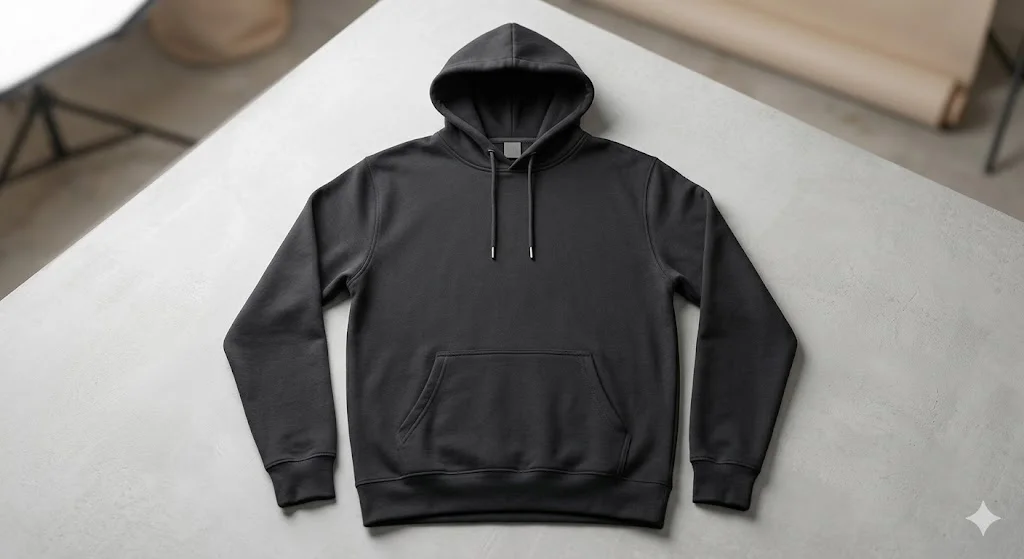
Hoodie mockups are one of the most popular clothing items in modern fashion. From streetwear brands to online print-on-demand stores, hoodie designs dominate platforms like Etsy, Shopify, and Instagram.
However, before selling or showcasing a hoodie design, creators usually need professional hoodie mockups. A good mockup helps customers visualize how the design will look when worn in real life.
Traditionally, designers had to rely on expensive mockup templates or Photoshop skills. Today, AI has completely changed the process.
With the right prompts, you can generate realistic hoodie mockups for free, including lifestyle scenes, studio product shots, and streetwear photography. In this guide, you’ll learn how to create hoodie mockups using AI tools and discover copy-ready prompts that generate stunning results.
What Is a Hoodie Mockup?
A hoodie mockup is a realistic visual representation of a hoodie used to showcase a design before production.
Instead of photographing an actual hoodie, designers use mockups to display:
- Logos
- Graphics
- Typography designs
- Brand artwork
- Print-on-demand products
Mockups often include:
- A model wearing the hoodie
- A folded hoodie product shot
- A hoodie hanging on a wall or hanger
- Lifestyle streetwear scenes
With AI, these mockups can be created instantly without photoshoots.
Why Use AI for Hoodie Mockups?
Unlimited variations
You can generate different poses, environments, and lighting styles.-
No Photoshop skills required
Everything is created directly from text prompts. -
Custom lifestyle scenes
AI allows you to place hoodies in realistic settings like cafés, streets, or studios. -
Cost-effective
Most AI tools offer free or low-cost generation. Because of these benefits, AI mockups are becoming the preferred solution for designers and online sellers.
Best AI Tools for Hoodie Mockups
-
Midjourney
Excellent for realistic fashion photography and streetwear visuals. -
Stable Diffusion (SDXL)
Great for product-focused mockups with high detail. -
Leonardo AI
Very useful for clean product renders and brand presentations. -
DALL·E
Works well for simple product mockups and minimal designs. For best results, include terms like “realistic hoodie mockup,” “fashion photography,” and “studio lighting.”
Key Elements of a High-Quality Hoodie
Mockup Prompt
To create a realistic mockup, your prompt should include several important elements.
Hoodie style
Oversized, streetwear, athletic, or minimalist hoodie.
Model or product type
Model wearing hoodie, folded hoodie, or hanging hoodie.
Environment
Studio background, urban street, café, gym, or lifestyle setting.
Lighting
Soft studio lighting, natural sunlight, or cinematic lighting.
Camera perspective
Front view, side angle, close-up, or flat lay.
Resolution
High resolution or 4K quality.
When these elements are combined properly, AI produces professional-looking results.
Copy These AI Prompts for Hoodie Mockups
Below are high-quality prompts designed to generate free hoodie mockup visuals with realistic detail.
Minimal Studio Hoodie Mockup
Prompt
“Realistic hoodie mockup, plain hoodie with clean front design area, minimal studio background, soft lighting, fashion product photography, ultra-detailed, high resolution.”
Best for:
- Print-on-demand stores
- Product catalogs
- Shopify product pages
Streetwear Hoodie Lifestyle Mockup
Prompt
“Streetwear hoodie mockup worn by a young model walking in an urban street, modern fashion style, natural lighting, trendy streetwear vibe, high-detail fashion photography.”
Best for:
- Instagram clothing brands
- Streetwear promotions
Oversized Hoodie Fashion Mockup
Prompt
“Oversized hoodie mockup worn by a model, relaxed streetwear style, neutral background, soft shadows, high-end fashion photography, ultra-realistic, 4K quality.”
Best for:
- Fashion brand presentations
- Clothing lookbooks
Folded Hoodie Product Mockup
Prompt
“Folded hoodie mockup placed on clean table surface, minimal product photography setup, soft studio lighting, realistic fabric texture, ultra-high resolution.”
Best for:
- E-commerce listings
- Print-on-demand previews
Hoodie Hanging on Wall Mockup
Prompt
“Hoodie hanging on wooden hanger against minimal wall background, modern lifestyle setting, soft natural lighting, realistic clothing photography.”
Best for:
- Brand websites
- Product showcase banners
Gym Lifestyle Hoodie Mockup
Prompt
“Athletic hoodie mockup worn by fitness model inside modern gym, dramatic lighting, sporty fashion aesthetic, high-detail realistic photography.”
Best for:
- Fitness clothing brands
- Sportswear promotions
Coffee Shop Lifestyle Hoodie Mockup
Prompt
“Casual hoodie mockup worn by person sitting in cozy coffee shop, warm natural lighting, lifestyle fashion photography, realistic fabric texture.”
Best for:
- Lifestyle brands
- Social media marketing
Pro Tips for Better Hoodie Mockups
To improve your results, follow these prompt tips:
- Mention “mockup” clearly
- Add fashion photography style
- Specify lighting conditions
- Use clean background instructions
- Generate multiple variations
- Add “front design space” if showcasing graphics
These small details greatly improve realism.
Where Hoodie Mockups Are Used
AI-generated hoodie mockups are extremely useful for:
- Print-on-demand stores
- Shopify product listings
- Etsy digital products
- Clothing brand websites
- Instagram promotions
- Fashion portfolios
- Online ads
Because visual presentation affects buying decisions, high-quality mockups significantly increase product appeal.
Benefits of AI Hoodie Mockups
Fast design presentation
Create product previews instantly.-
Cost-efficient
No photoshoot or professional model required. -
Creative flexibility
Test multiple styles and settings. -
Scalable for online stores
Generate mockups for dozens of products quickly.
Common Mistakes to Avoid
- Not specifying the hoodie type
- Overloading prompts with too many scene details
- Forgetting lighting instructions
- Ignoring camera angle descriptions
Clear and focused prompts generate the best results.
Final Thoughts
Hoodie mockups are essential for showcasing clothing designs professionally. However, thanks to AI tools and well-crafted prompts, creating these visuals is now easier than ever.
Related Prompts or Content
- [Prompt: Act as my personal assistant]
- [Prompt: Act as an AI art prompt generator.]
- [Prompt: ChatGPT Sites]
- [Prompt: How to Use AI GPT to Create Expert-Level Content With a Single Prompt]
- [Prompt: Act as an AI art prompt generator.]
- [Prompt: Act as an expert Midjourney prompt engineer. ]