ChatGPT for Facebook refers to using the power of AI to create, optimize, and manage content for the platform. Although Facebook doesn’t have a built-in ChatGPT tool, you can still use ChatGPT externally to generate posts, captions, replies, ads, and even images that align with your brand.
Additionally, more creators are now integrating ChatGPT into Facebook marketing workflows because it increases productivity while ensuring consistent quality.
Why Use ChatGPT on Facebook?
Using ChatGPT for Facebook brings several benefits, and as you continue exploring, you’ll notice how smoothly it fits into your social-media strategy. For instance:
Faster Content Creation
ChatGPT writes your posts in seconds, so you can stay consistent without spending too much time.
Better Engagement
The tool suggests conversation-driven captions that spark likes, comments, and shares.
Time-Saving Automation
You can automate replies, comment ideas, and DMs, allowing you to focus on growing your business.
Creative Marketing Ideas
ChatGPT helps you brainstorm new angles, story formats, and viral content ideas almost instantly.
How to Use ChatGPT for Facebook Content
Although ChatGPT can help in many areas, the platform is especially powerful for content creation. Below are some smart ways to use it:
Generate Facebook Post Ideas
You can ask ChatGPT to generate content ideas based on your niche. Moreover, you can refine them to match your tone and audience.
Write Engaging Captions
Whether you want emotional, educational, or humorous captions, ChatGPT can craft them instantly.
Create Facebook Ads
From ad copy to variations for A/B testing, ChatGPT helps you build high-converting ad creatives.
Craft Replies & Comments
You can automate thoughtful replies that keep engagement high, all while sounding natural.
Write Facebook Bio or Page Description
A well-crafted bio improves visibility and builds trust—and ChatGPT can create one in seconds.
Facebook Prompts for ChatGPT (Copy & Use)
Here are ready-to-use prompts specially designed for Facebook content creation:
Facebook Post Prompts
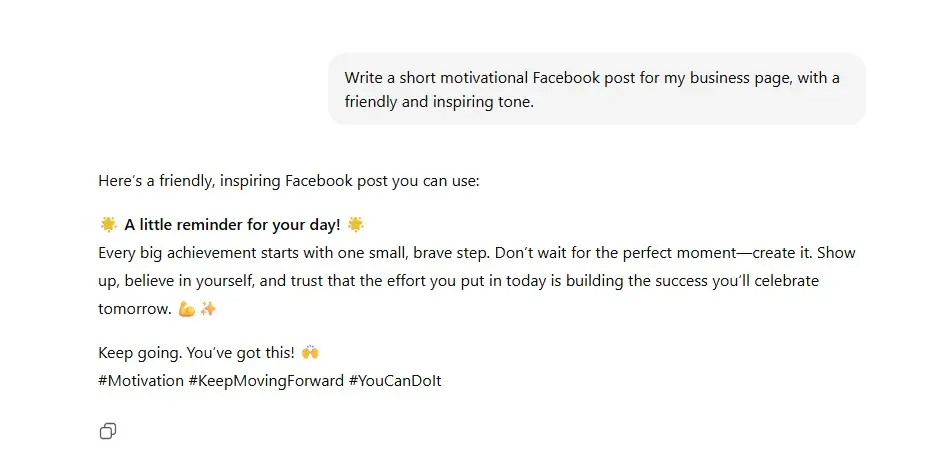
- “Write a short motivational Facebook post for my business page, with a friendly and inspiring tone.”
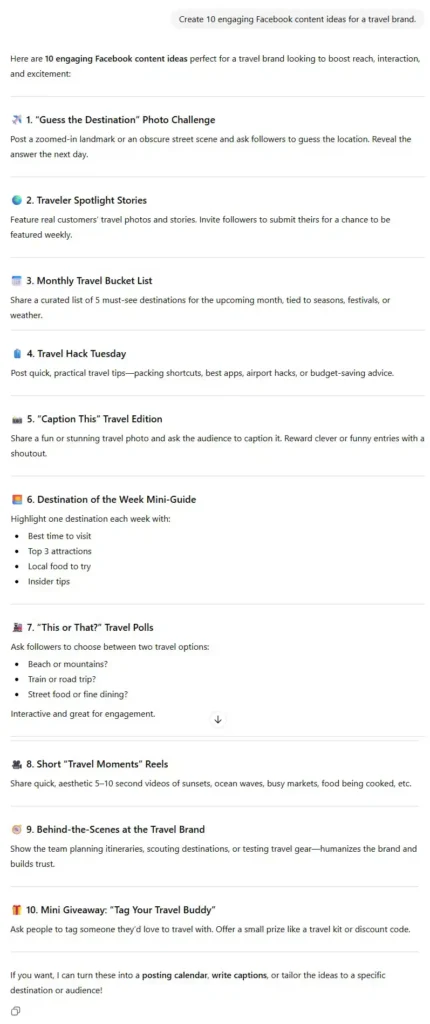
- “Create 10 engaging Facebook content ideas for a travel brand.”
Facebook Caption Prompts
- “Write a catchy Facebook caption about launching a new product, using a conversational tone.”
- “Create a humorous caption for a selfie at work.”
Facebook Ad Prompts
- “Write a high-converting Facebook ad copy for an online course that teaches AI tools.”
- “Create three variations of a Facebook ad headline for a fitness program.”
Facebook Engagement Prompts
- “Generate 15 questions I can ask on Facebook to increase audience interaction.”
- “Write friendly replies to positive customer comments.”
Tips to Get Better Results with ChatGPT on Facebook
To ensure your content feels personalized and deeply engaging, consider using these tips:
Add your target audience
Tell ChatGPT who you are writing for so the content aligns with their interests.
Specify your tone
Whether friendly, bold, professional, or funny—define it clearly.
Give examples
Provide sample posts you like, and ChatGPT will mirror the style.
Use long-tail prompts
More details lead to more accurate and personalized results.
Final Thoughts
As Facebook continues to evolve, using AI tools like ChatGPT becomes not just helpful but essential. Because it speeds up content creation, enhances creativity, and improves engagement, ChatGPT lets you grow your Facebook presence more effectively and effortlessly.
Now that you’ve explored how ChatGPT can transform your Facebook content strategy, you can start using the prompts and tips above to enhance your workflow today.
Related Prompts or Content
- [Prompt: Act as my personal assistant]
- [Prompt: Act as an AI art prompt generator.]
- [Prompt: ChatGPT Sites]
- [Prompt: Act as an expert in [your topic]]
- [Prompt: Act as an AI art prompt generator.]
- [Prompt: Act as an expert Midjourney prompt engineer. ]